
Professional Studio Monitoring System Calibration
May 9, 2008
The Instructions:
Instructions for electro-acoustic calibration of a professional stereo, 2.1 and 5.1 studio monitoring systems (speakers) using a SPL meter and ADL’s test files. If you are interested in calibrating a home theater system, we recommend using the test signals and procedures included with your home theater receiver.
Before starting, download the ADLTestFiles.zip (15 MB). To download the zip file, “Right Click” and select “Save Target As” and the file will begin downloading.
Once downloaded, either burn the test files on to a CD or import them directly into your DAW and follow the instructions below.
Additional Required Items
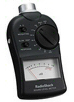
- Stereo, 2.1 or 5.1 Monitoring System
- SPL Meter – such as the SPL meter sold by RadioShack in the U.S.
ADLTestFiles.zip Includes 4 files:
- 1000Hz SINEWAVE -20dBFS.wav – a 1kHz file recorded at -20dBFS for electrical calibration
- 40-80Hz PINK NOISE -20dBFS.wav – a 40Hz to 80Hz bandwidth limited pink-noise file recorded at -20dBFS
- 500-2.5kHz PINK NOISE -20dBFS.wav – a 500Hz to 2500Hz bandwidth limited pink-noise file recorded at -20dBFS
- Pink Noise full bw -20dBFS.wav – a full-bandwidth pink-noise file recorded at – 20dBFS
All the test signals were created and measured on the Prism Sound dScope III and conform to the AES 17 guidelines for digital audio measurements. Because pink noise has a high crest factor, the levels of the pink noise signals were made using a time averaging technique, where multiple time samples are captured and averaged over a ten second interval to calculate the RMS level. These test files are all mono files. Please make sure you hard assign them to the left and then the right, not both channels at the same time. If you are using a CD / CD player, use only one channel of the CD player.
Theory
The purpose of calibration is to adjust the overall electro-acoustic system gain so that 0dBVU of electrical signal level equals a certain acoustic level at the listening position. Since most recording media is now digital, the reference electrical signal level is usually –20dBFS with 20dB of headroom. The reference SPL however can vary based on the delivery media and speaker type.
Please note that the bandwidth limited signals that have been provided, limit many of the room interaction affects often associated with measuring SPL and broadband pink noise.
*Also note that the LFE channel gain in 5.1 formats varies from 0 to +10 dB depending on the encoding format used. This level is referenced to the bass-managed subwoofer level, which is listed as “SUB” in the chart below. Since the LFE channel is not calibrated as a separate entity, the LFE gain will not affect system calibration. It is important not to confuse the bass-managed subwoofer calibration level with the LFE channel. For more information about bass-management and the LFE channel, please follow this link.
The common calibration levels are listed below:
| L | C | R | LS | RS | SUB* | |
| Movie Theatrical release | 85dB | 85dB | 85dB | 82dB | 82dB | 85dB |
| Movie DVD release | 85dB | 85dB | 85dB | 85dB | 85dB | 85dB |
| Broadcast / 85dBC or | 78dB | 78dB | 78dB | 78dB | 78dB | 78dB |
| Music (Stereo)** | 85dB | 85dB | 85dB | |||
| Music (5.1)** | 85dB | 85dB | 85dB | 85dB | 85dB | 85dB |
**IMPORTANT: When compared to movie soundtracks, music tends to be much more compressed, with reduced dynamics and greater overall level. Because of this, music mixes may seem too loud when played back on a system calibrated for an 85dBc reference level. If this is the case, we recommend calibrating for a lower reference level, such as 78dBc.
All test signals are recorded at –20dBFS including the 1 kHz sine wave tone. The sine wave tone is used to set the electrical output level throughout the signal path, right up to the point you get to the speakers. While the various pink noise signals are used for acoustic measurements and calibration.
The following procedure assumes you are calibrating the system to 85dBc SPL. If you are calibrating to TV, etc. substitute the appropriate level from the above chart.
- TURN OFF THE MONITORING SYSTEM (until step 4)
- Remove all eq and dynamics from the signal path and set all controls to zero / unity gain. Play the 1kHz Sine Wave, hard assign it to the left channel only, and adjust the output fader so the so the output meter reads -20dBFS. If you are using an analog console or measuring the output of your D to A, set the output level to 0dB VU (typically 0dB VU is equal to +4dBu / 185 nanoWebers per meter / 1.23 Volts RMS – using a true RMS volt meter). Then hard pan the signal to the right channel output and repeat for the right channel. For a 5.1 system assign the channel to each output and repeat the adjustment procedure. Once calibrated do not move the output faders.
- Mute everything and make sure the 1kHz tone is OFF.
- Now that the system has been electrically calibrated, turn ON the SUB and SATs.
- Assign the 500-2.5kHz pink noise signal to the left channel only. Make sure there is nothing coming from the right channel (or any other channels). Because this signal is bandwidth limited, you don’t have to worry about turning the sub off. There are two methods of setting the levels.
- If you have a master monitor controller, with individual channel calibration adjustments (such as Blue Sky’s BMC), you can set the monitor gain controls on each speaker at the reference / max gain position and then adjust the master level control for 85 dBc. Then mark that master monitor level as your ‘reference position’ and use the individual channel calibration adjustment on your controller, to calibrate the rest of the channels, as outlined below. This method may not always be practical and if your monitors have too much gain, may result in a in poor signal to noise ratio.
- The other method is to set master monitor level to the position you want as a reference level and then use the individual monitor gain controls, until you measure 85 dBc. If you use this method you should mark the knob position, on each monitor, with a grease pencil so you can always go back to the reference level if the knob gets moved.
For either method:
SPL should be measured at the mix position, with the SPL meter at arms length, with the microphone at seated ear height, angled at approximately 45 degrees, and pointed at the center point between the left and right speakers.Once the left channel is set to 85dBc, repeat this step for the right channel (and C, LS & RS in a 5.1 system).
- Feed 40-80Hz pink noise signal to the left channel only. Adjust the subwoofer level control until the subwoofer reads 85dBc (slow) at the mix position. The meter will bounce around a little, so you will need to do a mental average (I tend to filter out the peaks in my mind, so I don’t set the sub too hot). The right channel should measure about the same and no additional adjustments need to be made.
- You can play the full-bandwidth pink noise, assigning it to the left and then the right channel (not at the same time). You should measure about 85dBc. It may be a little higher, because below 30Hz the room may have a little extra gain.No adjustments should be made with Full Bandwidth pink noise, unless you have an RTA (real time analyzer).
- You are finished and the calibration process has been completed – enjoy!
If you have any questions, please don’t hesitate to contact us, or leave a comment to this topic.


Hi ,
I need to calibrate my small studio room , I have a behringer ecm8000 mic and logic pro 8 ..can i calibrate my entire signal chain with pink noise generated from logic and try to eq my feed back pink noise signal from ecm8000 for flat response ?
if i do this response by analyzing the signal at the listening position …it means I am moitoring a good flat response all the time doesnt it ?
iif can make a template song like this in logic then my studio is calibrated all the time for flat response curve ..
please let me know if my thinking is wrong.
thanks,
Maruthi
Hello Maruthi:
I would be very careful using pink noise to EQ your system. The test signals above are designed to adjust the level of your system, including the relative level of the SUB.
In a small room, such as the typical recording studio, I would initially look at adding room / acoustic treatment, before I would look at adding EQ. Follow this link for more information.
If you are interested in adding EQ, then I would look for a time based analyzer, not just a frequency versus level analyzer. Something such as SMAART.
I hope this helps.
Cheers!
Pascal
Thanks for the resource and info. One point. according to Tom Holman, the theatrical SPL level is 85db spl when the reference tone at the outputs is set to -18dbfs. At -20dbfs the level should be calibrated at 83dbfs. Do you have a difference of opinion on this? Also, when calibrating level for theatrical mixes, using monitors that are not full bandwidth, with a sub, should the sub have a 10db boost above the monitors. I have bass management that I can engage on my monitor controller, so should the sub be calibrated at the same level as the monitors, and just use the bass management for the 10db boost? Also, because the pink noise that is used to calibrate the sub is band limited, will the 10db boost only read as 4 db higher?
Hello Mr. Charles Dayton:
Thank you for your questions.
With regard to our calibration level recommendations: These recommendations come from Dolby and are inline with current industry practices.
With regard to the calibration levels for the subwoofer: I believe you are confusing the LFE channel with the subwoofer and bass-management. We have an article on our website which addresses this common confusion. Follow this link for more information.
However, just to be clear, below are the levels you should use, depending on what you are calibrating and what type of test signal you are using:
Bandwidth limited LF test file (40Hz to 80Hz):
Bass-Managed Subwoofer Signal = 85dBc
LFE Channel @ +10 = 95dBc
Full-bandwidth Pink Noise:
Bass-Managed Subwoofer Signal = 79dBc (approx)
LFE Channel @ +10 = 89dBc (approx)
I hope this helps to answer your questions. Please let us know if you have any additional questions.
Cheers!
Pascal
A quick note about how ADL calculates the RMS value of the 1kHz test tone:
It appears that the reference level we are using for 0 dBFS is different from the reference level used by the manufacturers of some metering plug-ins by 3 dB.
We use the definition as specified by the Audio Engineering Society in AES17-1998-r2004, where 0 dBFS RMS is defined as the maximum digital value a 997 Hz sine wave can have in the system. Because the maximum value is defined using a sine wave, a square wave can theoretically have a maximum value of +3dBFS.
Because some metering plug-ins are defining 0dBFS RMS as the maximum possible amplitude for a square wave, instead of a sine wave, a sine wave will read 3dB lower on the RMS scale, but read correctly on the peak scale. These plug-in manufacturers are using a square wave as a reference because a square wave can cause overshoot in the digital reconstruction filters, when a 1kHz sine wave is used as the maximum digital value, which then causes clipping.
So based on this, we would recommend setting the reference levels, when using metering plug-ins that read a difference in level between peak and RMS levels, at -23dBFS on the RMS scale.
(from Rich Walborn – posted by Pascal)
I read the articles and I am still having problems understanding the LFE and subwoofer levels. When do I have to calibrate to 85 and when to 95?
Thank you for all the help.
Hello Carlos:
If you are calibrating a bass-managed system; then when calibrating the bass-managed portion of the subwoofer signal and sending the 40-80Hz pink noise signal to any of the main channels (the center channel for example), you should measure 85dBc.
If you take this same test signal and feed it directly to the LFE channel, then it should measure 95dBc (or +10dB of in-band gain above the main channels).
Please note: In a Blue Sky monitoring system, which is bass-managed, the LFE channel is typically not calibrated separately. You calibrate the bass-managed portion of the subwoofer signal and then the bass-management controller adds the +10dB of in-band gain to just the LFE channel (which is then summed with the bass-managed portion and sent to the subwoofer).
If your system is not bass-managed: Then feed the 40-80Hz pink noise signal to the LFE channel input and you should measure 95dBc (or +10dB of in-band gain above the main channels).
It is important not to confuse the LFE channel, bass-management and the subwoofer. Follow this link for more information.
Feel free to e-mail me directly, if you have any additional questions: pascal@audiodesignlabs.com
Cheers!
Pascal
So , if i calibrate a bass management system putting a 40 to 80 hz only on the left or right channel and measure 85 dbc ( the same as the main chanells ) coming from the subwoofer how should I know that the final sound material from the sub ( the LFE sound material plus the bass sound material comming from the main channel)will be 95 dbc totally ?, because I’m putting the test tone only in the main chanell and the bass management system routes the low frecuencies to the LFE but that`s the only sound material in the LFE channel , i don`t have input in my LFE channel.
thanks a lot!
Hello Diego:
If you want to confirm the LFE channel level is correct, you can route the 40 to 80Hz signal to the LFE channel directly, and it should read 95dBc, when the LFE channel is set to +10.
Again, it is important not to confuse the LFE channel with bass-management and the subwoofer. The LFE is part of the mix. Bass-management (like the crossover in a speaker) and the subwoofer are part of the monitoring system. Bass-Management should not be used to create a LFE channel.
For more information follow this link.
I hope this helps to explain it better.
Sincerely,
Pascal
Ok,sorry i read the article but i don`t understand the next thing. For the method describe above the sub is calibrated sending
the test tone to any main chanell and the bass management and re-routes by a filter the low frecuencies (the test tone in this case)of the main to the sub. I adjust the level of the sub until my spl meter reads 85 dbc (for this case). So ,why after doing this I will know that automatically the sub will 95 dbc (+10 db) for the same test tone if i put it directly to the LFE instead of the main chanell? I have control of the 0 to 10 db of gain that I can give only to the LFE chanell or is a fabric design? If I can , I should always give 10 db of gain to the LFE chanell?
Thanks again .
Hello Diego:
In most applications the LFE channel is designed to provide 10dB of additional headroom above the main channels, for low frequency effects, etc. This is accomplished by calibrating the LFE channel (not the bass-managed subwoofer portion of the main channels) so that it has +10dB of in-band gain above the main channels.
Most surround or bass-management controllers allow you to switch between 0 and +10dB on the LFE channel. The 0dB option is typically included for compatibility with sources that already have the +10dB boost on the LFE channel (such as with a DVD player, etc). However, if you are mixing or creating content, this is usually not the case, and in most cases it should be set to the +10dB position.
You can see how this works in practice by looking at the signal flow diagram of the Blue Sky BMC (follow this link).
(notice that the +10dB doesn’t impact the level of the bass-managed subwoofer portion of the main channels)
I hope this helps to clarify things further.
Cheers!
-Pascal